Flutter · Supabase · OpenAI

Your AI chat app, already built.

A ready-to-run Flutter app with streaming GPT-4o chat, voice input, saved chat history and a paywall screen, on a Supabase backend with Row Level Security. Paste your keys, run one SQL file, and start building the part that makes your app different.

iOS, Android & WebOne-time paymentFull source code
# .env
SUPABASE_URL=https://your-project.supabase.co
OPENAI_API_KEY=sk-…
USE_EDGE_FUNCTION=true   # production mode

$ flutter pub get && flutter run
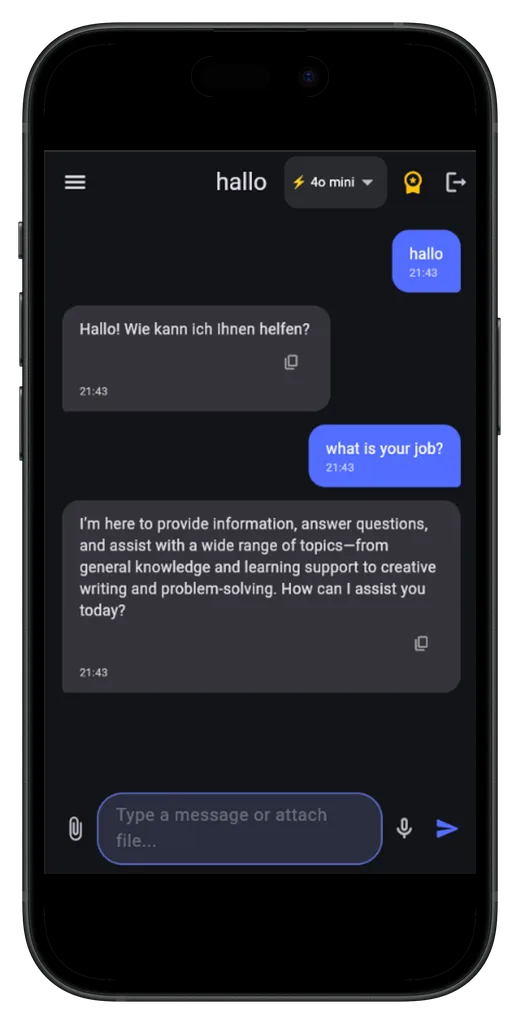
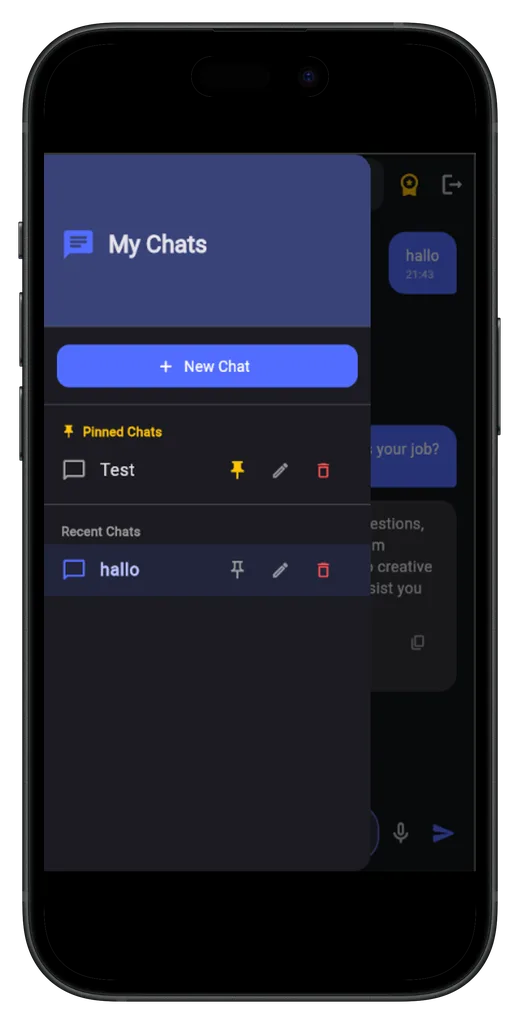
AI chat screen with streaming answers and model switcher Chat history with pinned chats
What's inside

The plumbing every AI app needs, wired up and working

Streaming AI chat

Answers arrive token by token over Server-Sent Events. Auto-scroll follows the answer and stops as soon as you scroll up to read.

Image understanding

Attach a photo and the model sees it. Switch between GPT-4o mini and GPT-4o right in the chat.

Less common in kits

Hands-free voice input

Speech-to-text with silence detection and auto-send, so users can talk instead of type.

Chat history

Every chat is saved per user. Pin, rename and delete chats. Images and files go to Supabase Storage.

Supabase, secure by default

Email auth, Postgres and Row Level Security: each user only ever sees their own chats and files. One schema.sql sets it all up.

Production mode

Your OpenAI key stays on the server

A ready-made Edge Function adds the key server-side and enforces a daily message limit per user (default 50).

Custom AI personality

Change one system prompt to turn the assistant into a fitness coach, a support agent or anything else.

Paywall screen

A Pro upgrade screen with demo mode, structured for RevenueCat so you can connect real purchases.

Friendly setup errors

All keys live in one .env file. If one is missing, the app shows a setup screen instead of crashing.

Under the hood

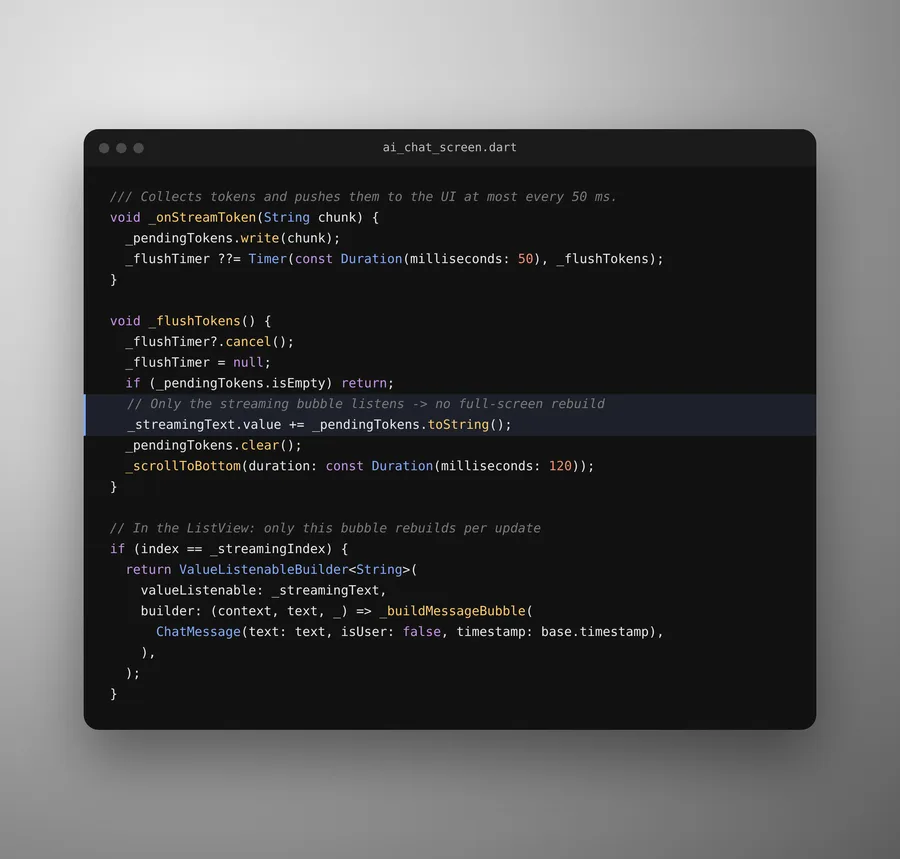
Smooth streaming instead of a stuttering chat

50ms

Tokens are collected and pushed to the UI at most every 50 milliseconds, and only the message bubble being written rebuilds, never the whole screen. State runs on Riverpod, navigation on go_router.

Dart code that batches streamed tokens and rebuilds only the active chat bubble
After you buy

From download to running app in about 15 minutes

  1. Download

    You get the full project as a .zip with a step-by-step README and a troubleshooting table.

  2. Add your keys

    Paste your Supabase and OpenAI keys into the included .env file.

  3. Set up the database

    Run schema.sql once in the Supabase SQL Editor. Tables, policies and indexes are created for you.

  4. Run it

    flutter pub get, then flutter run. When you're ready to ship, switch on production mode with one line.

Clear scope

What you get, and what you add yourself

Included and working

  • Streaming chat with GPT-4o and GPT-4o mini
  • Voice input, image attachments, chat history
  • Email sign up, sign in and sign out
  • Database schema with Row Level Security
  • Edge Function with a per-user daily limit
  • Paywall UI in demo mode

You connect or add

  • Your own Supabase project and OpenAI key (both have free or pay-as-you-go tiers)
  • RevenueCat keys and store products for real in-app purchases
  • Google or Apple sign-in, if your app needs it
  • A Mac, but only for building the iOS version
Pricing

Pay once, keep the code

Founder price for the first 10 buyers: use code FOUNDER at checkout for 50% off.

Single Use

CHF 99
  • 1 personal, client or commercial app
  • Full source code
  • One-time payment, no subscription
Get Single Use

Multi Use

CHF 249
  • Unlimited personal, client or commercial apps
  • Full source code
  • One-time payment, no subscription
Get Multi Use

Secure checkout through Lemon Squeezy. You can sell the apps you build. You can't resell the kit itself as a template.

FAQ

Questions

Can I try it before buying?

Yes. The live demo logs you in as a guest, no sign-up needed. It gives real AI answers, limited to 15 messages per day.

Do I need a Mac?

Only to build for iOS. Android and Web work on Windows, macOS and Linux.

Is my OpenAI key safe?

During development the app calls OpenAI directly with the key from .env, which is fine for testing. For release, production mode routes requests through the included Supabase Edge Function, so the key never ships inside your app, and each user gets a daily limit.

Does the paywall take real payments?

Not out of the box. The paywall runs in demo mode and is prepared for RevenueCat. You add your RevenueCat keys and store products to charge real money.

Why Supabase instead of Firebase?

You get a real Postgres database, SQL you can read, and Row Level Security policies that keep each user's data private. The whole schema is one SQL file.

Who do I contact for help?

Write to support@dohamasystems.com.